Download your videos: daily folders, ZIP and the deletion date
Download videos in reelbatch: find your daily folders, save on iPhone and Android, use the ZIP download and understand the “deleted soon” notice.

You download your finished versions right in the app: open the folder, tap the video, save it. In a campaign you get one folder with a subfolder per day (“Day 01”, “Day 02” and so on). Day 1 is ready first, the other days are added bit by bit, and you can download finished videos right away. On a computer you download a whole folder with “Download all as ZIP”. After 30 days the folders are deleted automatically, and we remind you three days before.
Series · part 5 of 6Getting started with reelbatch
This is part 5 of the “Getting started” series. How your campaign is created is covered in part 3: plan a campaign. Want to bring your own older Reels or TikToks into reelbatch from a link? That is explained in download your own Reels and TikToks.
Where to find your folders
As soon as something is ready, you get an email with a link. You can also find the folders in your overview at any time:
- In the list of your orders there is the “Open folder” button.
- On the order page you see your folder with the “Open download folder” button and the progress, for example “12 of 45 videos ready – more are added automatically”.
The folders open in a new tab. You don’t need a Google account or a password, just your personal link.
How the folders are organised
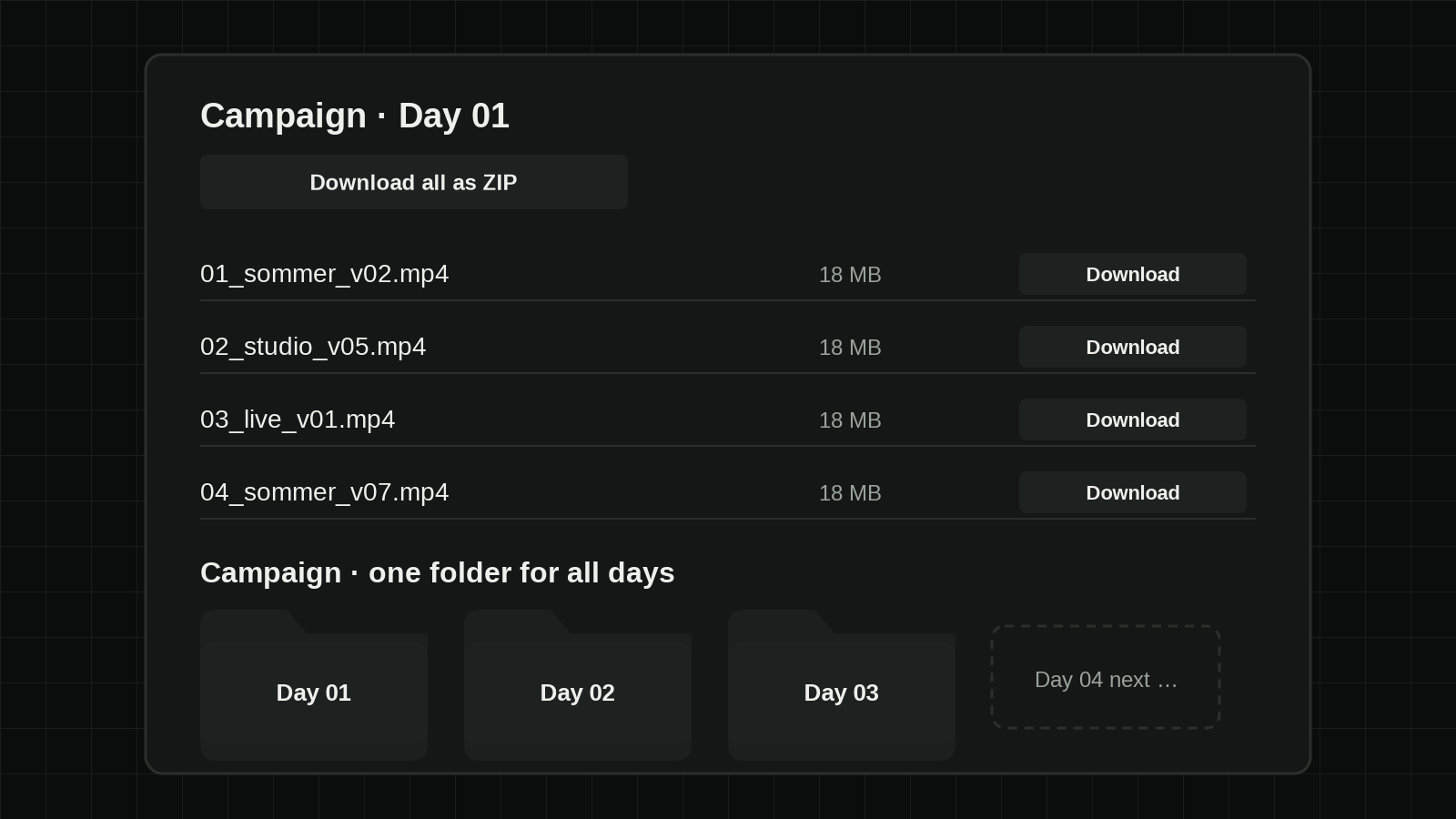
| Order | Folder | Contents |
|---|---|---|
| Campaign | One folder for the whole campaign | One subfolder per day inside: “Day 01”, “Day 02” …, each numbered in posting order: 01_…, 02_…, 03_… New days are added as soon as they are ready. |
| Single order | Your versions | All versions, with a subfolder per video if you uploaded several, numbered v01, v02 … |
The number at the front is the order. In a campaign folder you post a day’s videos in the order 01, 02, 03. reelbatch has mixed them so the same video rarely follows itself directly. The ending “_v03” tells you which version of the original it is.
Saving on your phone
On an iPhone
- Open the folder for the day. Via the email, your overview or the order page.
- Tap the video. It opens in the browser preview.
- Tap Share. The icon with the arrow pointing up.
- Choose “Save Video”. The video is now in your Photos app, ready for Instagram.
On an Android phone
- Open the folder for the day.
- Tap “Download” next to a video. The button sits to the right of the file name.
- Open it in your gallery or in “Downloads”. Depending on the phone, the video ends up in one of these places.
Only save the day that’s due
You don’t need to put all days on your phone at once. Save the day’s videos in the morning, post them and delete them from your gallery afterwards. Your phone stays tidy and you won’t mix up days.
Download all as ZIP
In every folder and every daily subfolder there is a “Download all as ZIP” button at the top. It downloads all videos of the folder as one file.
- Handy on a computer: one file instead of many single downloads, for example if you post from your computer or want to archive the videos.
- Usually more hassle on a phone: a ZIP file has to be unpacked before you can choose the videos in Instagram. On a phone, saving videos one by one is usually quicker.
“Deleted soon”: the deletion date
Finished folders are deleted automatically 30 days after completion or after the end of the campaign. That way your videos don’t stay with us longer than needed. Your original videos are deleted even earlier, as soon as your order is finished.
So you don’t miss anything:
- Email in advance: three days before deletion you get an email.
- Orange box in your overview: “Deleted soon – save now” lists every affected order at the top, with the date and buttons to open it, as a ZIP too if you like.
- Note in the folder: at the bottom of every folder it says on which day it will be deleted.
Deleted means deleted
Once the period is over, the versions are gone for good, for us too. Download everything you want to keep. Reels you have already posted on Instagram are of course not affected.
Want to close your account? Then save everything first. The guide Account and data: save your data and delete your account shows the steps in the right order.
When is what ready?
Day 1 of a campaign is ready shortly after the start. How quickly exactly depends on how many versions there are and how busy things are. The other days are created in the background, in time before you need them. You get at most two emails: one when you can get started with day 1 (only if the rest still takes a while) and one when everything is done. Both have the same link. You can also follow the status on the order page, for example queued or day 1 ready. The order in which reelbatch creates the days is explained in day 1 first.
Once the videos are on your phone, you continue in Instagram: how to post trial reels, step by step.
Frequently asked questions
I can’t find the email with the folder. What now?
No problem: all folders are also in your overview and on the order page. Check your spam folder too and save our sender address as a contact.
Can I download the videos more than once?
Yes. Until a folder is deleted after 30 days, you can open and download it as often as you like.
Why don’t I see a ZIP button?
The button appears in every folder that contains videos. If a folder is still empty because the videos are being created, there is no ZIP yet. Check back in a few minutes.
What happens to my folders when my plan ends?
You can still open finished folders until they are deleted after 30 days. Only new orders need an active plan.


