Day 1 first: how reelbatch works through your campaign
Day 1 first, then day by day into one folder: the order in which reelbatch creates campaigns, when your videos are ready and which emails you get.

When you start a campaign, reelbatch creates day 1 first so you can start posting quickly. Then day 2, day 3 and so on follow. Everything goes into one single folder with one link: every day has a subfolder there, and new videos are added bit by bit. reelbatch emails you at most twice: when you can get started with day 1 and when the whole campaign is ready.
No fixed times
How quickly your videos are ready depends on how many versions it holds and how busy things are. That’s why we don’t promise fixed times. The page of your order shows an expected time.
Day 1 first, everything in one folder
reelbatch creates your campaign in posting order: day 1 first, so your first posting day is ready as early as possible, then day 2, day 3 and so on. You get one folder with one link for it. Inside, every day has its own subfolder (“Day 01”, “Day 02” …). All videos are numbered in the recommended posting order (01, 02 …).
The link works as soon as the first video is ready. After that, the other videos are added by themselves. The top of the folder shows how far along it is, for example “32 of 120 videos ready – more are added automatically”. You can download finished videos right away.
Internally, reelbatch splits a campaign into blocks: day 1, then blocks of 3 days (Days 2–4, Days 5–7, Days 8–10 …). The blocks only set the order when several orders are running at the same time. They don’t have folders of their own.
Two special cases: the example campaign in the free trial only has 3 days and runs in one go, also in one folder. A single order has one folder for all versions.
Fair for everyone: round by round
If only your campaign is being worked on, reelbatch creates it in one go, without a break. Sharing only happens when several orders are waiting at the same time. Then it doesn’t go campaign by campaign but in rounds across all customers:
- First round: day 1 of every campaign and every trial.
- Second round: single orders and days 2–4 of all campaigns.
- Third round and onwards: days 5–7, then 8–10 and so on.
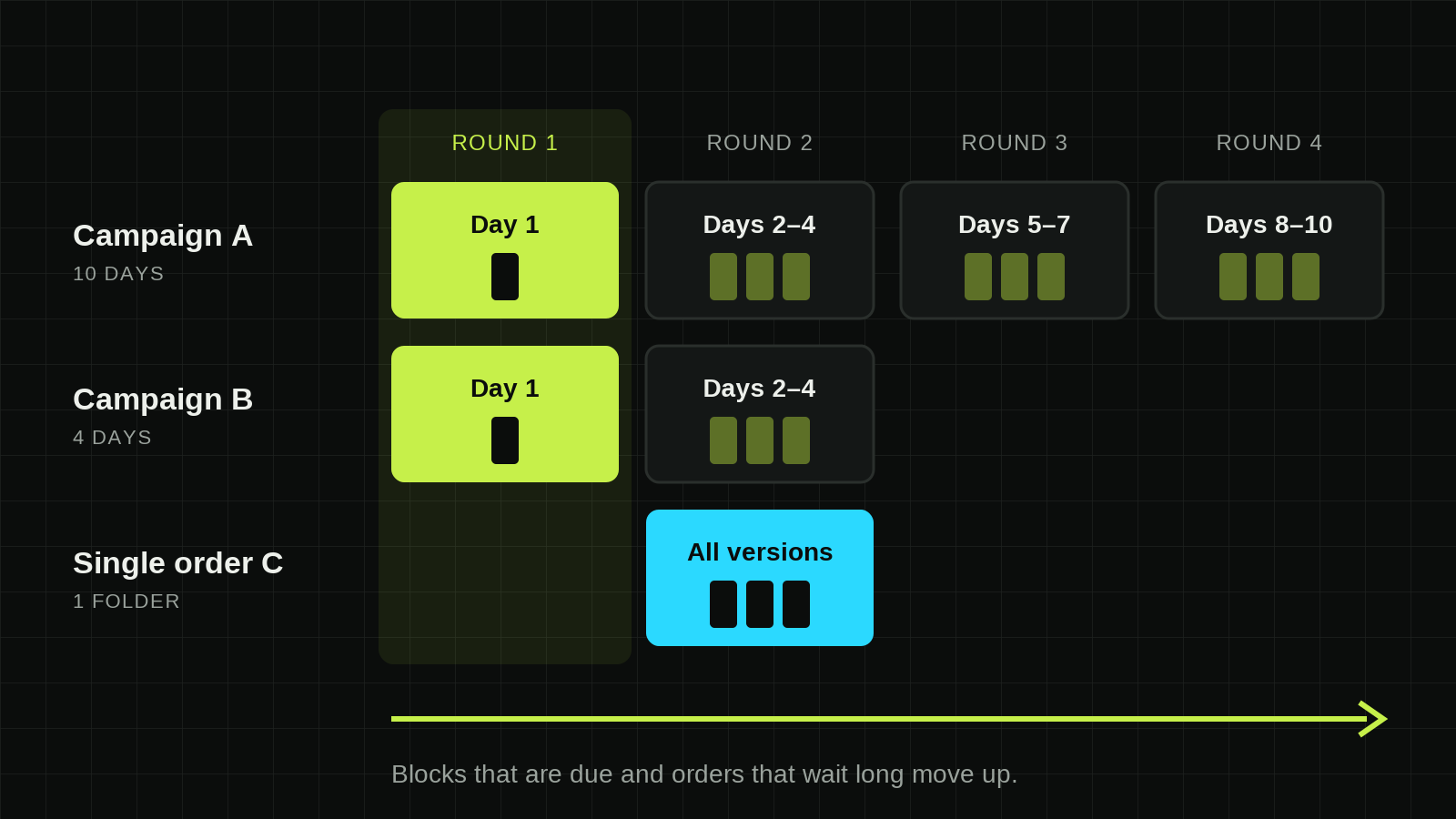
That way everyone gets their first days quickly, even when a very large campaign is waiting at the same time. If a new order comes in while your campaign is running, its day 1 goes first, then the two take turns. Within a round, the basic rule is: whoever ordered first goes first.
What moves up: due dates and waiting time
Two rules make sure no block arrives late and nobody gets stuck at the back:
- Due dates count. Once day 1 is ready, your campaign calendar starts: day 2 is the next calendar day, day 3 the one after. If the first day of a block is less than 24 hours away, the block moves up into the first round. Only day 1 of new campaigns stays ahead of it.
- Whoever waits long moves up. The longer an order has been waiting, the further ahead its next blocks are. Every 12 hours of waiting moves it up one round.
What you see in your area
- On the order page you see your campaign folder with the progress, for example “12 of 45 videos ready – more are added automatically”, and an expected time. As soon as the first video is ready, the “Open download folder” button appears.
- While your order is waiting, the top of the page shows how many versions are ahead of you in the queue.
- In the list of your orders, the “Open folder” button takes you straight to your folder.
You don’t need to keep the page open. reelbatch keeps working in the background.
At most two emails
- “Day 1 of your campaign is ready” with the link to your folder. You can get started, the rest goes into the same folder.
- “Your campaign is complete” once all days are ready, with the same link.
The first email only comes if the rest will take a while. If your campaign is complete shortly afterwards anyway, you only get the second one, so your inbox stays calm. There are no other emails in between. For a single order there is one email once all versions are ready.
How to follow your campaign
From the start to the last day
- Start the campaign. Upload your videos, check the plan and tap “Start campaign”. After that you can close the page.
- Wait for the email. As soon as you can get started, an email arrives with the link to your folder. You also find the link on your order page.
- Post day 1. In the “Day 01” subfolder the videos are numbered in posting order. Spread them across the day.
- Open the same folder every day. The other days are added to your folder bit by bit, each as its own subfolder (“Day 02”, “Day 03” …).
- Completion email. When all days are ready, “Your campaign is complete” arrives. Then download everything you haven’t saved yet.
How to open folders, save videos on your phone and what works with ZIP files is covered in download your videos.
Using the app in German?
There the day subfolders are called Tag 01, Tag 02 …, the button is Download-Ordner öffnen, and the emails are titled Tag 1 deiner Kampagne ist fertig and Deine Kampagne ist komplett fertig.
How long does it take?
To be honest: it can’t be said to the minute. It depends on how many versions your campaign has, how long your videos are and how many orders are running at the same time. Day 1 is usually ready shortly after the start. The order is designed so that every further day is ready before you need it. If things are very busy, it can still take longer. The expected time on the order page is an estimate, not an appointment.
Try it yourself
In the free trial you see the process for yourself: day 1 first, then the rest. You don’t need payment details and you don’t take out a subscription. Try it free
Frequently asked questions
Why isn’t the whole campaign ready straight away?
When things are quiet, it often is: then your campaign runs straight through. When several orders are waiting, everyone should get their first days first. If reelbatch created one large campaign in one go, everyone else would have to wait that long. And you only need day 5 on day 5.
Do I get an email for every day?
No. There are at most two: when you can get started with day 1 and when the whole campaign is ready. The days in between go into your folder without an email.
Can I move later days forward?
Not yourself. If you need to post earlier than planned, write to us at info@reelbatch.de. We’ll see what we can do.
How does it work for a single order?
A single order has one folder with all versions and one email as soon as it is ready. In the order, it comes after day 1 of the campaigns that are waiting at the moment.
And in the free trial?
There, day 1 comes first, and days 2 and 3 follow straight after in the same folder. If everything is ready quickly, you only get one email.


