Download your own Reels and TikToks and reuse them
Download your own Reels and reuse them: paste a TikTok or Instagram link, watch the video, save it or add it straight to your next campaign.

New since version 0.7. All news in the app
With “Get a video from a link” you load one of your own TikTok or Instagram videos straight into reelbatch: paste the link, watch it, download it or add it to your next campaign with one tap. That is handy when you want to show an old Reel again but no longer have the original file. You don’t have to save it to your phone first and upload it again.
Only your own videos or videos you hold the rights to
The downloader is meant for your own videos or videos you hold the rights to, for example because a client hired you. Downloading and reposting other people’s videos can infringe copyright and personal rights, even if it works technically. Keep an eye on the music as well: a song from the Instagram or TikTok music library does not automatically belong to you. Before your first download you confirm this with a tick.
In every plan
The downloader is part of every plan, the trial included, as long as your plan is active. Downloads cost no trial reels. Only when you start a campaign with the video do the versions count, like with any uploaded video.
What the downloader is for
- Recycling old Reels. A Reel did well months ago, but the file has long gone from your phone. Copy the link, paste it, done.
- From TikTok to Instagram. One of your TikToks should run as a trial reel on Instagram. The downloader gets it, reelbatch turns it into versions.
- For teams and agencies. A client sends the link to her own Reel instead of a file. You add it straight to her campaign.
- For musicians. A snippet you have already posted on TikTok goes into your release week campaign without a detour.
It is not meant for other people’s trends, reposts or videos where you are not sure about the rights.
The limits at a glance
| What | Limit |
|---|---|
| Downloads per day | 20 per account, free again after midnight (German time). Failed ones don’t count. |
| Length | videos up to 3 minutes |
| Resolution | up to 1080p (Full HD). Larger videos are scaled down to Full HD. |
| At the same time | at most 3 videos loading at once |
| Links | one link at a time, TikTok or Instagram (Reel or post with a video) |
| Storage | files stay for 24 hours, then they are deleted automatically |
At the top of the page you always see how many downloads are left today, for example “17 of 20 left today”.
Step by step: get a video from a link
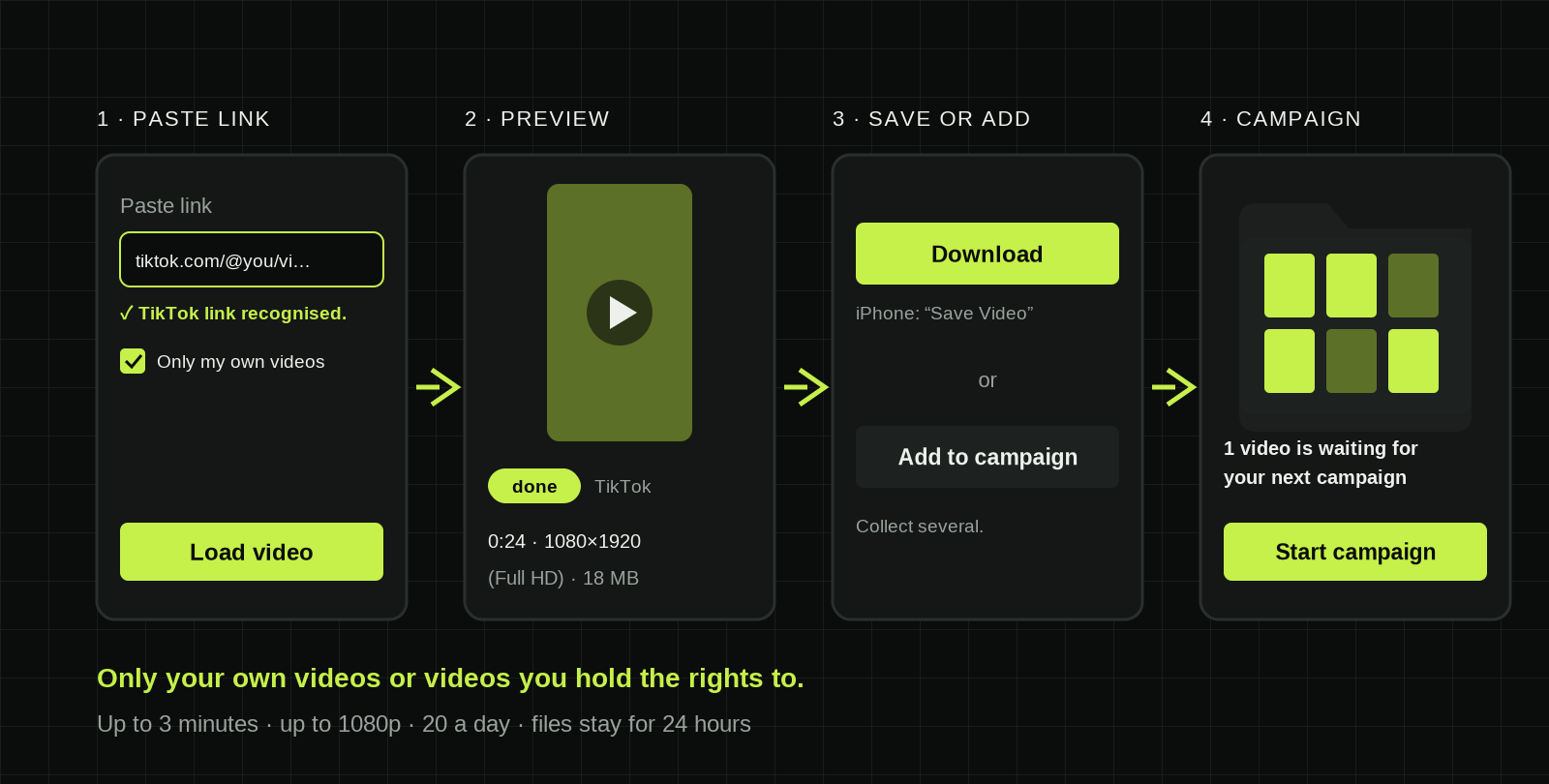
Load one of your own videos from a link
- Open the card. Your overview shows the card “Get a video from a link”. Tap “Paste link”.
- Copy the link. Open your video in Instagram or TikTok, tap share and then “Copy link”. TikTok’s short share links work too.
- Paste the link. Into the “Paste link” field; on a phone you can also use “From clipboard”. reelbatch shows right away “TikTok link recognised.” or “Instagram link recognised.”
- Confirm the first time. Tick “I only use my own videos or videos I hold the rights to.” After that, the page shows when you confirmed it.
- Tap “Load video”. Under “Your downloads” you see “waiting …”, “loading …” and then “done” as it happens. You don’t need to reload the page.
- Watch it. Every finished video has a preview with a still to play it, plus title, length, resolution and size.
- Save it or add it. “Download” saves the video; on an iPhone you then tap “Save Video” and it ends up in your Photos. Or tap “Add to campaign”.
Add to campaign: what happens next
With “Add to campaign”, reelbatch copies the video into your account as a normal upload. It is checked exactly as if you had uploaded it yourself. The button changes to “✓ In your next campaign – remove”, and the top of the page shows, for example, “1 video is waiting for your next campaign”.
- Collect several. Feel free to add several videos before you start. They wait together.
- Start. Tap “Start campaign” or “Single order”. The videos are already in the form, just like uploaded videos.
- Take one out. Tapping “✓ In your next campaign – remove” takes the video out again. The download itself stays.
- Don’t wait too long. Added videos show “Ready until …”. Start the campaign by then, otherwise simply load the video again.
How to set up the campaign is explained in plan a campaign. New hooks for the old videos come from the hook ideas, where the AI sees stills from the video: AI hook generator: ideas that know your video.
Example: recycle old Reels in one afternoon
Bring five old Reels into a new campaign
- Pick them. Look through your profile for three to five of your own Reels from the last few months that did well or matter to you.
- Paste the links. One after the other. At most three load at once, add the next one as soon as one is done.
- Take a quick look. Is it the right video, is the quality good enough? Then “Add to campaign”.
- Start the campaign. Write or get new hooks, choose the strength, set the days and reels per day.
- Post and review. As trial reels, the versions go to people who don’t follow you first. Afterwards the numbers show which old video still lands today.
Whether a recycled video does well again depends on the content and the audience, not on the downloader. More ideas on which content works are in content recycling on Instagram.
Common mistakes and what to do
| Message or problem | What you can do |
|---|---|
| “This is not a TikTok or Instagram video link.” | Often it is a profile link. Open the single video and copy its link. |
| “Please paste only one link at a time.” | Always one link in the field, the next one afterwards. |
| “The platform does not allow this video to be loaded without logging in …” | Private or age-restricted videos don’t work, public Reels usually do. Otherwise upload the original file yourself. |
| “This post has no video (images only).” | Photo carousels can’t be loaded, only posts with a video. |
| “The video is longer than 3 minutes.” | Shorten the video first and upload the shortened file yourself. |
| “3 videos are already loading.” | Wait a moment until one is done. |
| “All 20 downloads for today are used up.” | You can continue after midnight. |
| The video looks blurry | Without logging in, Instagram sometimes only provides a lower resolution. For the best quality, upload the original file. |
| The download is gone | Files stay for 24 hours. Download them or add them to a campaign in time. |
If a download fails, tap “Try again”. Failed downloads don’t count towards the 20 per day.
Privacy and security
- No login needed. reelbatch loads public videos without logging in. We never ask for your Instagram or TikTok password.
- Only your downloads. You only see the videos you loaded yourself.
- Deleted automatically. After 24 hours the files are gone. If you delete your account, all downloads are deleted too.
Frequently asked questions
Can I use the downloader for other people’s videos?
No. The downloader is only for your own videos or videos you hold the rights to. You confirm this with a tick before your first download, and it applies to every download.
Does it work with private Reels?
No. reelbatch loads without logging in, so only public videos work. Private or age-restricted videos are best uploaded as the original file.
Can I load YouTube Shorts or other platforms?
No, the downloader only takes links from TikTok and Instagram. Videos from other platforms are uploaded as a file, as usual.
Do downloads cost trial reels?
No. Loading and downloading costs no trial reels. Only the versions created in a campaign or a single order count towards your allowance.
How long do the loaded videos stay?
24 hours. After that the files are deleted automatically. Each video shows when it will be deleted.
Can I paste several links at once?
No, always one link at a time. But up to three videos can load at once, and you can add several finished videos to your next campaign together.


