How to post trial reels: step by step in Instagram
How to post trial reels in Instagram: from the saved video to the trial option to sharing with followers. With posting order and common stumbling blocks.

You post a trial reel like a regular reel, with one extra switch: before sharing, you turn on the trial option. Instagram then shows the reel to people who don’t follow you yet first. Here we go through it step by step, from the video in your gallery to deciding whether your followers get to see it.
Series · part 3 of 5Understanding trial reels
This is part 3 of the “Understanding trial reels” series. What trial reels are is explained in part 1, and when a regular reel is the better choice in part 2.
How current this is
Instagram changes menus and labels regularly, and not every feature is available on every account. We describe the process as Instagram introduced it for trial reels (as of September 2026, Instagram for Creators). The exact button names in your app may differ.
Before you start: check the requirements
- Professional account: as far as is known, trial reels are only available to professional accounts (creator or business). You can switch in the Instagram settings under account type. Which type suits you is covered in Creator or Business: which account for Reels.
- Public account: the option isn’t available for private accounts.
- Other conditions: Instagram has adjusted the requirements several times since launch, for example the minimum number of followers. Sources disagree on the details. The most reliable check is your app: if the trial option appears when you share a reel, you can use it.
- Video on your phone: save the day’s videos from your reelbatch folder to your gallery. How that works is covered in download your videos.
Step by step
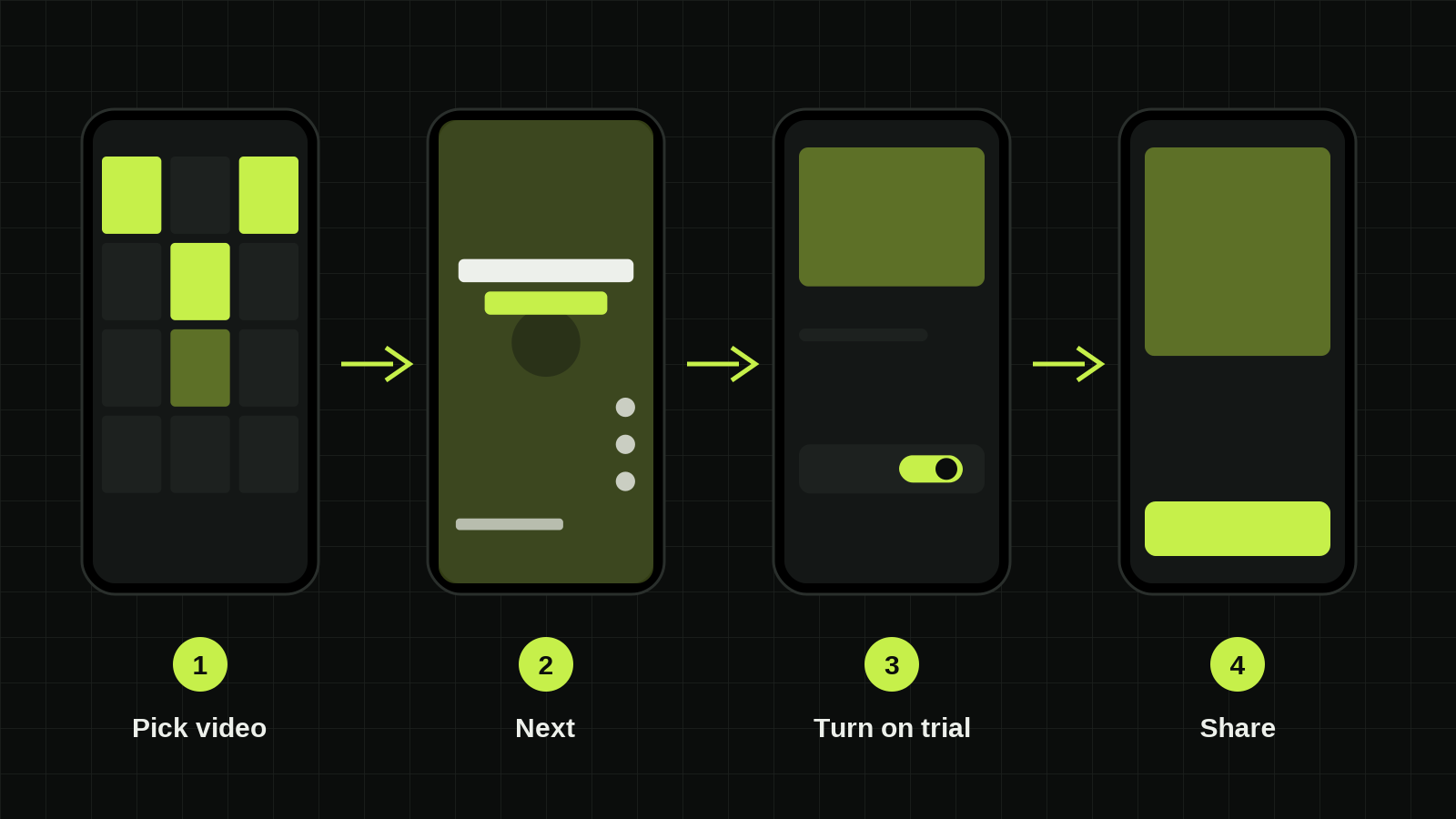
Post a trial reel
- Start a new reel. Open Instagram, tap the plus and choose “Reel”.
- Pick the video. Choose the day’s first video from your gallery, the one with 01 at the start of the file name.
- Edit if needed. If you already added your hook with reelbatch, don’t add a second text on top. You can change music or the edit here as with any reel. Then “Next”.
- Write a caption. Just like a regular reel: one or two sentences, a question or a clear pointer works well. A few fitting hashtags are enough.
- Turn on the trial option. On the screen before sharing you find the switch for trial reels. Turn it on.
- Decide about sharing with followers. Instagram offers to share the reel with your followers automatically if it performs well in the first 72 hours. Or you decide later yourself.
- Share. The trial reel now goes to people who don’t follow you first. It doesn’t appear in your profile grid.
- Next video. Repeat with 02, 03 and so on until the day’s folder is done.
Order and spacing
The numbers in the daily folder are the recommended order. reelbatch has mixed the videos so that two versions of the same original rarely follow each other directly.
Instagram gives no official guidance on how much time should pass between two trial reels. We suggest not posting them all in the same minute but in a way that fits your day: a few in the morning, a few in the evening, or in several batches. Sticking with it matters more than the perfect time. More in how often to post reels.
Turn on the reminder
In your reelbatch overview you can choose a time under “Daily reminder”. You then get a short email on every campaign day with the link to that day’s folder.
After posting
- Wait for the numbers: according to Instagram, you see the first metrics for a trial reel after about 24 hours.
- Find your trial reels: your trial reels are in your profile under reels or in a separate trial reels section, depending on your app version.
- Share with followers: if a trial reel does well, you can share it with your followers. It then also appears in your profile. If you chose automatic sharing, Instagram does that when the reel performs well in the first 72 hours.
- Take notes: write down which file was which trial reel. How to turn that into your next round is covered in review your campaign.
Common stumbling blocks
| Problem | Possible cause | What you can do |
|---|---|---|
| No trial option visible | Private or personal account, feature not yet available for your account | Check your account type, update the app |
| Text twice on the video | Hook added in reelbatch and again in Instagram | Add text in one place only |
| Text covered by buttons | Text too close to the edge | Use “Show areas” in reelbatch, see safe zone |
| Video looks blurry | The video hasn’t finished downloading | Wait until the download is done, then pick it again |
A complete list to tick off before every post is in the reels checklist.
Frequently asked questions
Do I have to post every trial reel separately?
Yes. Instagram doesn’t offer a combined upload of several videos as trial reels. Each video is its own post with its own trial option.
Do my followers see trial reels?
Not at first. Instagram shows them to people who don’t follow you first. Your followers only see a trial reel once you share it with them or automatic sharing kicks in.
Can I delete a trial reel afterwards?
Yes, like any other reel, via the menu on the reel. The finished versions in your reelbatch folder aren’t affected until the folder is deleted after 30 days.
Do trial reels need a specific time of day?
No, Instagram doesn’t set a fixed time. Post so that you manage it on every campaign day. Regularity helps your review more than the perfect minute.


