Song snippet for reels: which part of your song to use
How to pick the right song snippet for reels: find the hook in your song, choose length and opening, and test several snippets fairly with trial reels.

The right song snippet for reels is the part of your song that works within the first seconds, even for someone who has never heard of you. Usually that is the hook: the chorus, a line that sticks, or a clear switch in the beat. Which part really works for people who don’t know you yet is rarely clear in advance. So you pick two or three candidates and test them against each other instead of betting on one.
This article is for artists, managements and labels and covers which part of the song belongs in the reel. When to post it around a release is covered in release week on Instagram. Formats you can build around the snippet are in reel ideas for musicians.
What makes a good song snippet
A reel with music is heard differently from a song in a playlist. Nobody waits patiently for the chorus. A good snippet therefore does four things:
- It starts in the moment. No intro, no count-in. The very first second already belongs to the part people should remember.
- It has a peak. A line, a melody, a switch. Without a clear moment a snippet feels like a random cut.
- It ends on purpose. Either it completes a line, or it stops just before the resolution so people want to hear more. Cut off mid-word, it feels unfinished.
- It fits the picture. A quiet moment in the song under fast cuts feels off, and so does a drop under a still image.
Not everyone has the sound on
Some people scroll with the sound off. A short text on screen, such as a line from the song or a hook like “Wait for the chorus”, gives them a reason to turn the sound on. Where text stays readable is explained in the Instagram reels safe zone.
Where the hook in your song is
The strongest part is not always the chorus. These candidates are almost always worth a look:
| Candidate | When it fits | What to watch |
|---|---|---|
| Chorus | It is catchy and instantly clear | Start right on the first line of the chorus |
| A strong line | One sentence in the song sticks or tells a story | Put the line on screen as text as well |
| The switch | Drop, beat switch, the moment everything kicks in | Start just before the switch so it lands |
| The build-up | The pre-chorus builds tension, the chorus releases it | Can end right in the middle of the tension |
| The signature riff | A motif people recognise straight away | Only if it really is your trademark |
| The stripped-back version | Voice and one instrument, without the full production | Feels close, works well next to the finished version |
How to decide which candidates to use:
- Listen like a stranger. Jump to any point in the song and ask yourself: would I keep listening here?
- Ask open questions. “Which part stuck in your head?” tells you more than “Do you like the chorus?”.
- Look at what already worked. The line people sing along to at shows, or the part people commented on, is a good candidate.
- Don’t decide too early. If two parts feel equally strong, that is exactly the question a test answers.
How long should the snippet be?
There is no fixed length that always works. A snippet is as long as the moment you want to show, and no longer. A chorus often needs more time than a drop, a single line less than a whole verse.
Two rules of thumb help when cutting:
- Short first. Start with a tight cut that shows exactly the moment. You can always make it longer later.
- Length is a test question. Cut the same part once short and once longer and compare both. Then you know it for your song instead of following a general rule.
In reelbatch each video can be up to 3 minutes long and up to 150 MB in size (MP4, MOV or M4V). For a snippet you usually need only a fraction of that.
The opening: the first seconds
Where the snippet starts often matters more than where it ends. Three openings you can compare:
- Right in the moment: the first second is already the hook line or the drop. Very direct, but without a build-up.
- Just before: one or two bars before the moment. You can feel that something is about to happen.
- With text as a bridge: a hook like “Listen to the second line” carries a short build-up.
A tip from the edit: put the start on the beat rather than on a second that feels about right. A snippet that starts on the one feels right immediately. The same goes for the end if you want the reel to loop.
Testing several snippets fairly
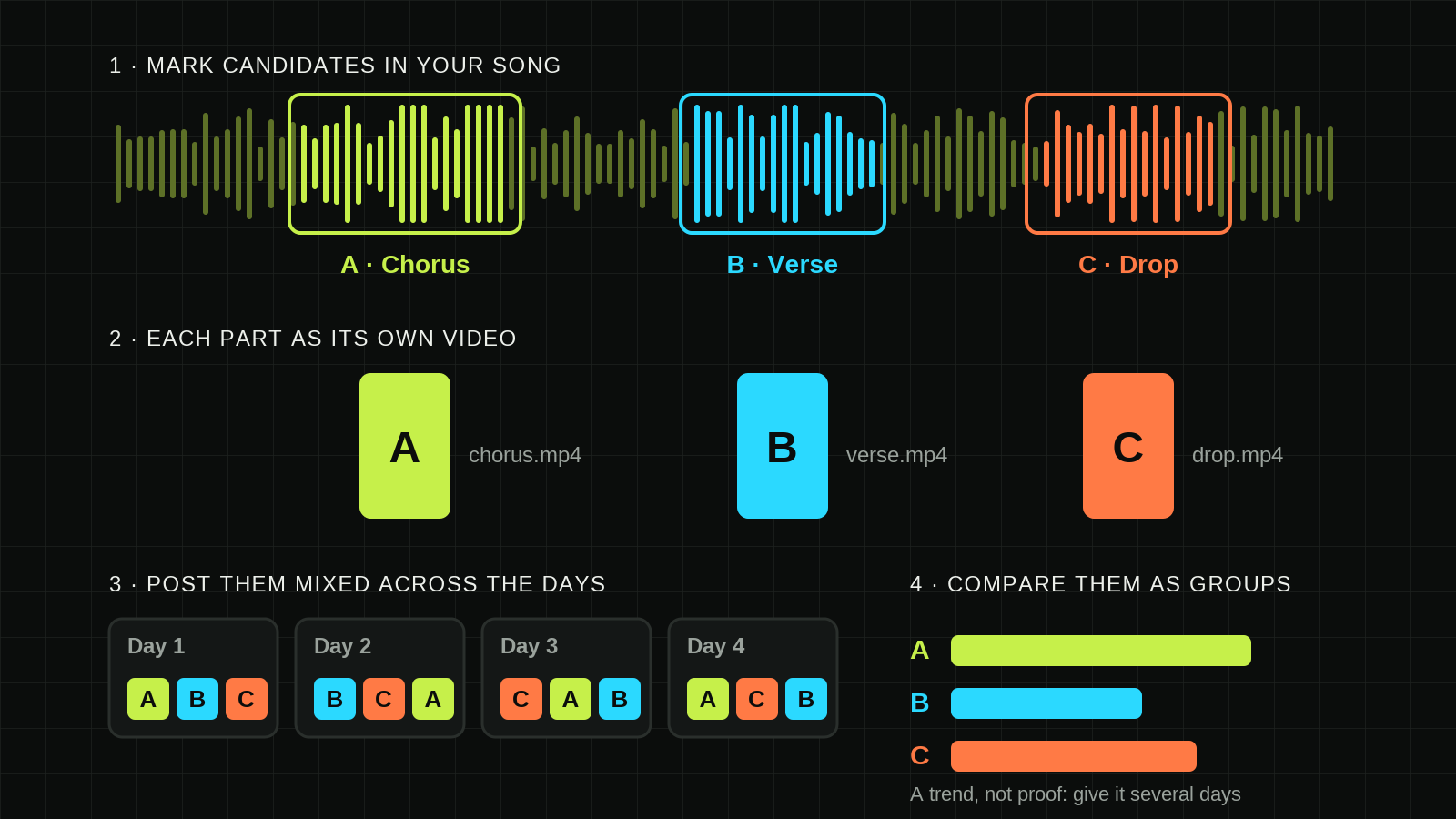
A fair test changes only one thing. If snippet A has different footage, a different hook and a different posting time from snippet B, you won’t know in the end what made the difference.
Prepare a snippet test
- Pick two or three candidates. For example the chorus, a strong line and the drop. With more candidates each gets fewer trial reels and the differences get blurry.
- Cut each part as its own video. Same footage, same look, only the part of the song changes. Give the files clear names like
chorus.mp4ordrop.mp4. - Treat all snippets the same. The same hook for all of them, or no hook for any of them.
- Post them mixed over several days. Not only snippet A on day 1 and only snippet B on day 2, or you end up comparing weekdays instead of snippets.
- Compare them as groups. Compare all reels with snippet A to all reels with snippet B, not one single reel to another.
Trial reels suit this kind of test well: they are shown to people who don’t follow you first, and they only appear on your profile if you share them. So you can try several snippets without filling your grid with near-identical clips. More in test trial reels, and how to read the numbers in trial reels analytics.
An example: 3 snippets with 9 trial reels a day over 7 days make 63 trial reels, so 21 per snippet. The form in reelbatch shows right below the sliders how many videos fit your plan.
Illustration with sample numbers. Actual results vary.
Before you upload your snippets
How reelbatch helps with your snippet test
reelbatch does not cut your song. You choose and cut the parts yourself, for example in your editing app. After that reelbatch does the legwork, so you have enough versions of every snippet to post each day:
- A campaign with your snippets. You upload each part as its own video and set reels per day and duration. reelbatch creates many slightly changed versions of each video and spreads them across the days in a mix, with one folder per day. Before you start you see the plan as a calendar and can reshuffle it with “Shuffle again”. Everything about it is in plan a campaign.
- Your song at its original tempo. In the expert settings you switch off “Speed”, and every version plays at exactly the tempo of your original. With “Volume and tone” off, the volume and sound of your mix stay unchanged. You can switch them individually from the Standard plan and in the free trial. Details in expert settings: switch changes on and off.
- One hook for all snippets. In the “Text in video” step you add hooks. A new hook applies to all videos at first, and in campaigns you can assign it to single videos. For a fair snippet test you leave it on all of them. How that works is in plan hooks per video.
- File names you recognise. In the download folder the number at the front is the posting order of the day and the middle part is the name of your original. If your upload is called
chorus.mp4, you recognise every version straight away when posting and taking notes. - Compare results. In your customer area under “Results” you tick off what you posted and enter numbers from Instagram, or import them as a CSV file from Meta Business Suite. reelbatch then shows you which videos have done better for you so far, and honestly says “Not enough data yet” while there are too few. With “Start a new round with the best video” you plan the next round right away. How the import works is in export trial reel results from Meta Business Suite.
reelbatch has no access to your Instagram account. You post yourself, and the numbers come from you. More about reelbatch for artists, managements and labels is on the reelbatch for music page.
To be honest
A test shows you a trend, not proof. Two trial reels never run under exactly the same conditions, and what works well one week can look different the next. Whether a snippet reaches new people is up to Instagram in the end, and whether they stay is up to your song. The test simply helps you not to decide on gut feeling alone.
And after the test?
The strongest snippet gets the lead role, for example as a regular reel on release day, or by sharing the best trial reels with your followers. The other candidates aren’t lost: a part that was weaker as an opening can work better with a different hook or in a different format. The same approach works for older songs, more in show your older songs again.
Frequently asked questions
How long should a song snippet for reels be?
There is no fixed length. The snippet should be as long as the moment you want to show. Start with a short cut and test it against a longer cut of the same part.
Chorus or verse: which goes into the reel?
Often the chorus, because it is the catchiest part. Sometimes, though, a single line from the verse carries more because it tells a story. If you are unsure, cut both as separate videos and compare them with trial reels.
How many snippets should I test at once?
Two or three. With more candidates each one gets fewer trial reels and the differences become harder to see. After the first round you can put the winner up against a new candidate.
Does reelbatch cut the snippet out of my song?
No. You upload finished parts as videos. reelbatch creates many slightly changed versions of them, spreads them across the days of your campaign and adds hooks as text if you like.
Does reelbatch change the tempo of my song?
As long as “Speed” is on, each version plays a few percent faster or slower, and the sound follows. If your song should play at exactly its original tempo, switch off “Speed” in the expert settings. That is possible from the Standard plan and in the free trial.
May I post snippets before the release?
That depends on your contracts. Check with your label or distributor beforehand whether and from when you may show parts of the song, and whether the song will be available in Instagram’s music library at release.


