Placing text in reels correctly: the safe zone explained
Where text stays readable in Instagram reels: which areas the app covers, how big text should be and how to make hooks easy to read.

The safe zone is the area of a reel that the controls of the Instagram app don’t cover. At the top there is the header and account name, at the bottom the caption, sound and profile, on the right the buttons for like, comment and share. Important text belongs in the middle, with some distance from every edge.
Series · part 5 of 6Text on video
Sounds obvious, but it’s overlooked all the time: a perfect hook with the account name on top of it is a wasted hook.
Which areas does Instagram cover?
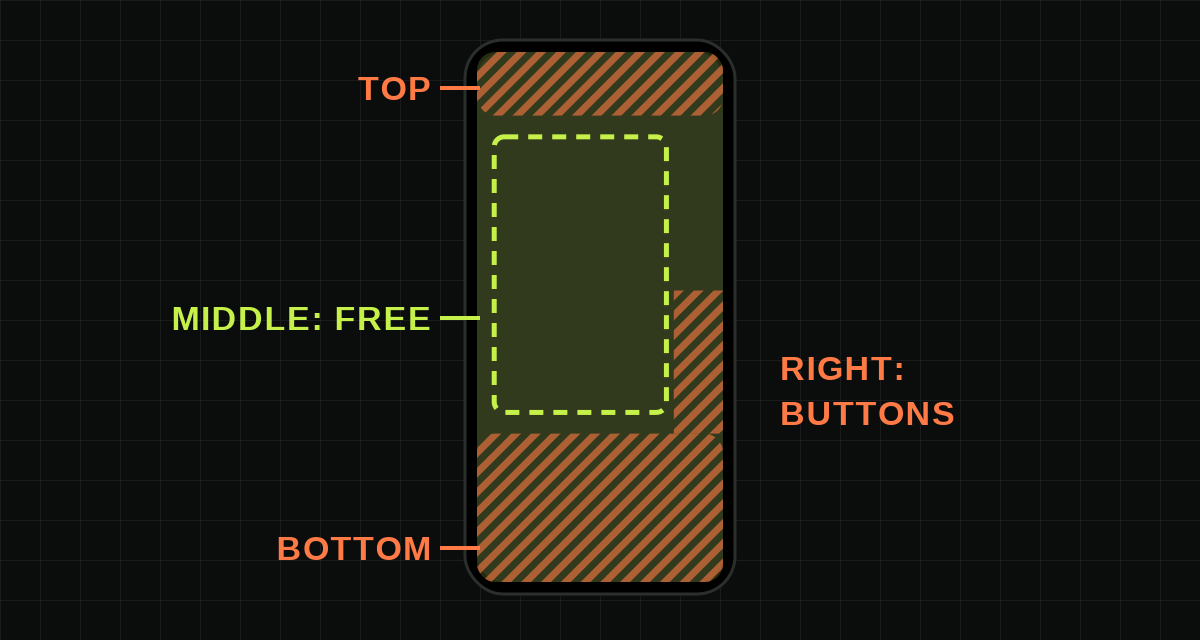
- Top: the app’s header. Depending on the view, icons and labels sit here.
- Bottom: the biggest covered area. Account name, caption, sound info and sometimes buttons sit on top of the video. With longer captions this area grows.
- Right: a column of icons for like, comment, share and more.
The exact sizes change with app versions, phone sizes and views, for example in the profile grid, where reels are shown cropped. So there are no fixed measurements that always apply. Plan with generous margins instead.
The simple rule
Important text in the middle, a little above the centre. Some margin on the left, more on the right. Better no important text at the bottom at all.
If you put text at the bottom of the picture, for example as subtitles, also read Reels subtitles. It explains what the Subtitles look does and what reelbatch doesn’t do.
How big should text in a reel be?
Reels are watched on phones, often while scrolling past. Text must therefore be readable at a glance:
- Big enough: one line with a few big words rather than three lines of small type.
- Short: a hook with three to eight words is read in one or two seconds.
- Contrast: light text on a dark background or the other way round. An outline or a box behind the text helps on busy pictures.
- Line breaks: break lines by meaning, not in the middle of a phrase.
Think text and picture together
Text shouldn’t cover the most important thing in the picture, such as a face or an instrument. So look at a still from the first seconds before you set the position. If there is room in the top third, text sits well there. If the face is there, choose the middle or a box with slight transparency.
Mind the profile grid and cover
In the profile grid, Instagram shows reels in a different aspect ratio than full screen, so cropped. Text at the top or bottom edge is often cut off there. If a reel should look good in the grid later, that’s another reason to keep text in the middle.
By the way, trial reels don’t appear in the profile grid as long as you don’t share them with your followers. More in what are trial reels?. How to plan the first frame is explained in Reels cover image.
Common mistakes
- text at the very bottom, where the caption sits
- text at the right edge below the buttons
- type that’s too small so “more fits”
- light text on a light background without an outline
- text covering the face
How reelbatch helps
In the text step you see your text as a preview on a still of your own video. With “Show areas”, the preview colours the spots that Instagram and TikTok cover. reelbatch keeps the text out of the covered areas. Which settings for position and size you see depends on your plan. More in the guide add text to your reels.
How to set position, size and alignment in the reelbatch text editor and show the covered areas is explained in the guide add text to your reels. Covered text is one of the most common reels mistakes.
Frequently asked questions
Where is the safe zone in Instagram reels?
Roughly in the middle of the picture, with distance from every edge. At the top is the header, at the bottom the caption and account name, on the right the icons. The exact sizes depend on the app version and phone.
Does the safe zone apply to TikTok too?
The principle is the same: there are controls at the top, bottom and right there too. The areas are similar but not identical. If you keep text in the middle, you’re usually on the safe side on both platforms.
How much text fits in a reel?
One line for the hook, two at most. Longer explanations belong in the video or the caption.


