Feedback & ideas: send praise, criticism and wishes to reelbatch
How to send reelbatch feedback: the “Feedback & ideas” card on your overview, the three kinds and where you find our replies.

Got an idea, like something or find that something gets in the way? Tell us directly in reelbatch. On your overview you’ll find the card “Feedback & ideas”. Your message goes only to reelbatch and is not public. We read everything ourselves and reply to you. A lot of reelbatch came out of feedback like this.
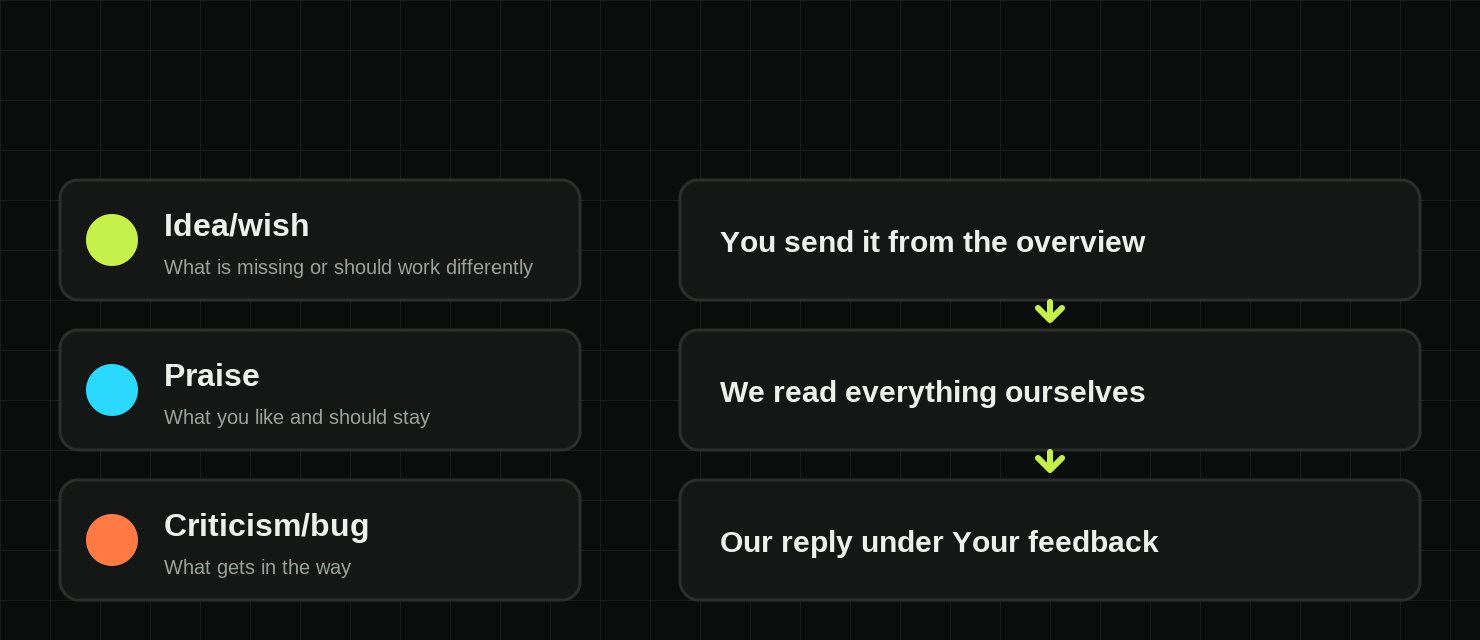
The three kinds
The form asks you to choose one of three kinds. Each one has its purpose:
- Idea/wish: You’d like something that doesn’t exist yet, or something should work differently. Write down what you want to achieve. That helps us the most.
- Praise: You like something. One short sentence is enough, and we know what to keep.
- Criticism/bug: Something doesn’t fit, is unclear or isn’t solved well. Describe where it happened and what you expected.
How to send your feedback
- Open your overview and tap the card “Feedback & ideas”.
- Choose the kind: Idea/wish, Praise or Criticism/bug.
- Under “What’s it about?” you can optionally pick the feature you mean.
- Write your message. More than 2000 characters won’t fit in.
- Tap “Send”. Then a note appears that your message has arrived.
An example of an idea
A good idea can sound like this: “I’d like to see more videos per day before I release them. Then I can check the order calmly.” The sentence tells us not only what you wish for, but also why. That’s exactly what we need to decide how to solve it.
Your feedback and our replies
Below the form you’ll find the page “Your feedback”. It shows your messages, and our replies appear underneath them. A message can also show a status. “Done – thank you” means your idea is now in reelbatch. “Resolved” means the matter is closed. If you have a new reply, the card “Feedback & ideas” on your overview shows “1 new reply”. With several replies, it shows the number of new replies.
You can also delete one of your own messages. The page asks you once more before it removes anything.
A problem is something else
Feedback & ideas is meant for wishes, praise and criticism. If something no longer works at all, use the card “Report a problem” on your overview. The form says this, too: “Something stopped working entirely? Use “Report a problem” on the overview.”
If a video gets stuck while uploading, the guide Upload reels helps you first. When something goes wrong, always describe what you did and what happened next.
Commenting on what’s new
Under every item in What’s new you can react with one click and write a comment. A comment is addressed only to reelbatch by default. You’ll find our reply under “Your feedback”, too.
What a good message contains
Three details help us most:
- What did you want to do? The goal matters more than the solution you had in mind.
- Where was it? Name the page or the feature, for example the folder or the overview.
- What happened? A short example is enough. Don’t include passwords or the names of other people.
- How often does it happen? Once, every time or only with certain videos. That helps us find it more than you might think.
What if my message gets longer than that?
Then put the most important part first: the goal, the place and an example. More than 2000 characters won’t fit in the form anyway. Short and precise beats long and vague.
Will I get a reply?
Frequently asked questions
Is my feedback public?
No. Feedback & ideas goes only to reelbatch. Your message doesn’t appear on the website.
Will I get a reply?
Yes. We reply to you under “Your feedback”. We don’t name a fixed time frame. Check the page whenever you like.
Can I comment on something new without using the form?
Yes. Under every item there’s a “Comment” button. The default is “only to reelbatch”, so only the team sees your comment.
Can I delete a message again?
Yes. On the page “Your feedback” you can remove your own message. Before it does, the page asks you once more whether you really want to delete it.
In short
Idea, praise or criticism? The card “Feedback & ideas” on your overview is the right way. For a fault that blocks everything, use “Report a problem”. You’ll always find our replies under “Your feedback”.
For more about everyday work in reelbatch, see the reelbatch guide.


